
【實戰】Day 29:打造 AI 個人助理 — 對話記憶 + 角色性格設定
把 ERP AI 幕僚升級為真正的 AI 個人助理:後端 JSON 對話持久化(切頁面不遺失)、類 ChatGPT 對話清單切換、PydanticAI message_history 多輪記憶,以及四個辯論角色的性格外部化到 JSON——不改 code 即可調整業務、生管、財務、總經理的個性與分析重點,PUT API 熱重載立即生效。
WRITTEN BY

- Name
- Harry Chang
之前的測試的性格是寫在紀錄檔案,今天要實際實作記錄對話與組合個人助理的對話記憶,再切回來原本的對話卻什麼都不記得了?今天把它升級成真正記得你的 AI 個人助理。
- 今日目標
- 設計決策:切換對話後 AI 自動接續上下文
- 架構說明
- 請求時序圖
- Step 1:後端對話 CRUD
- Step 2:後端 agent.py 加入 conv_id
- Step 3:前端 API helpers
- Step 4:ConversationList 元件
- Step 5:AgentChat 佈局與切換邏輯
- Step 6 升級:Agent 性格 JSON 外部化
- 測試流程
- 記憶行為說明
- 今日 Checklist
- 小結
今日目標
| 功能 | 說明 |
|---|---|
| 對話清單(左側面板) | 類 ChatGPT 的對話列表,可切換 / 刪除 / 新建 |
| 後端 JSON 持久化 | 對話存於 backend/data/conversations/{user_id}/{conv_id}.json,跨裝置不遺失 |
| 自動對話標題 | 第一則訊息自動成為對話標題 |
| Mode A LLM 記憶 | message_history 讓 AI 在同一對話內、切換後都記住上下文 |
| 🧠 記憶狀態提示 | 控制列顯示「AI 記憶中」,讓使用者知道 AI 有 context |
設計決策:切換對話後 AI 自動接續上下文
| 本文實作 | |
|---|---|
| 切換對話 | AI 自動接續舊對話上下文(後端每次請求自動載入 history_json) |
| LLM history 存哪 | 後端 JSON(history_json 欄位),前端只傳 conv_id |
| 複雜度 | ⭐⭐⭐ |
每次 POST /agent/query/stream 帶上 conv_id,後端就從 JSON 讀取 history_json 並注入 message_history。切換到舊對話再送出訊息,AI 即可接續上文回答,無需前端額外處理。
架構說明
backend/data/conversations/{user_id}/{conv_id}.json
  ├── id, mode, title, created_at
  ├── messages: Message[]   ← UI 顯示用
  └── history_json: string  ← PydanticAI 序列化對話歷史(多輪記憶)

React state
  ├── conversations: ConvMeta[]  ← 清單 metadata(不含 messages)
  └── activeMessages: Message[] ← 當前對話訊息(in-memory display)
請求時序圖
時序圖 ↔ Step 對照
| 時序步驟 | 對應 Step | 說明 |
|---|---|---|
| ①②③④⑤ | Step 1 | GET /conversations → 後端 list_conversations_meta,回傳 ConvMeta 清單 |
| ⑥⑦⑧⑨ | Step 1 | GET /conversations/:id → load_conversation,取得最新對話歷史訊息 |
| ⑩⑪ | Step 2 | conv_id 傳入;後端從 JSON 載入 history_json,agent.run(message_history=None) |
| ⑫ | Step 2 | _append_stream_turn 在串流前存 messages + history_json 到 JSON 檔 |
| ⑬ | Step 3 | SSE stream + DONE,前端 appendChunk 即時顯示 |
| ⑭⑮⑯⑰ | Step 2 | 第二輪:後端讀取已存的 history_json → agent.run(message_history=history) → 存回 |
| ⑱ | Step 3 | 第二輪回應,AI 有上下文,可追問 |
| ⑲⑳㉑㉒ | Step 4 | handleSelect → GET /conversations/:other_id,載入 UI 訊息;下次 POST agent 後端自動還原 LLM context |
Step 1:後端對話 CRUD
data_loader.py 新增函式
CONV_DIR = DATA_DIR / "conversations"

def load_conversation(user_id: str, conv_id: str) -> dict | None:
    p = CONV_DIR / user_id / f"{conv_id}.json"
    if not p.exists():
        return None
    return json.loads(p.read_text(encoding="utf-8"))

def save_conversation(data: dict) -> None:
    p = CONV_DIR / data["user_id"] / f"{data['id']}.json"
    p.parent.mkdir(parents=True, exist_ok=True)
    p.write_text(json.dumps(data, ensure_ascii=False, indent=2), encoding="utf-8")

def delete_conversation(user_id: str, conv_id: str) -> bool:
    p = CONV_DIR / user_id / f"{conv_id}.json"
    if p.exists():
        p.unlink()
        return True
    return False

def list_conversations_meta(user_id: str) -> list[dict]:
    """只回傳 metadata,不含 messages / history_json"""
    user_dir = CONV_DIR / user_id
    if not user_dir.exists():
        return []
    result = []
    for f in user_dir.glob("*.json"):
        d = json.loads(f.read_text(encoding="utf-8"))
        result.append({
            "id":         d["id"],
            "mode":       d.get("mode", "stream"),
            "title":      d.get("title", "新對話"),
            "created_at": d.get("created_at", ""),
        })
    return sorted(result, key=lambda x: x.get("created_at", ""), reverse=True)
routers/conversations.py(新增路由)
router = APIRouter(prefix="/api/v1", tags=["conversations"])

@router.get("/conversations")          # ?user_id=gm_harry
def list_convs(user_id: str = Query(...)):
    return {"data": list_conversations_meta(user_id)}

@router.post("/conversations")
def create_conv(req: CreateRequest):
    conv_id = f"conv-{int(datetime.now().timestamp()*1000)}-{uuid4().hex[:4]}"
    data = {"id": conv_id, "user_id": req.user_id, "mode": req.mode,
            "title": "新對話", "created_at": datetime.now().isoformat(),
            "messages": [], "history_json": None}
    save_conversation(data)
    return {"data": {"id": conv_id, ...}}

@router.get("/conversations/{conv_id}")
def get_conv(conv_id: str, user_id: str = Query(...)):
    data = load_conversation(user_id, conv_id)
    if not data:
        raise HTTPException(status_code=404)
    return {"data": {k: v for k, v in data.items() if k != "history_json"}}

@router.delete("/conversations/{conv_id}")
def delete_conv(conv_id: str, user_id: str = Query(...)):
    delete_conversation(user_id, conv_id)
    return {"status": "success"}
Step 2:後端 agent.py 加入 conv_id
AgentRequest 新增欄位
class AgentRequest(BaseModel):
    message: str
    user_id: str = "gm_harry"
    conv_id: str | None = None  # 有值時從 JSON 載入歷史,並在完成後存回
agent_query_stream 載入 + 存回歷史
# 從對話 JSON 載入 LLM 歷史
msg_history = None
if request.conv_id:
    conv_data = load_conversation(request.user_id, request.conv_id)
    if conv_data and conv_data.get("history_json"):
        msg_history = ModelMessagesTypeAdapter.validate_json(
            conv_data["history_json"]
        )

async def generate():
    result = await order_agent.run(
        request.message,
        deps=deps,
        message_history=msg_history,   # ← 注入對話歷史
    )
    text: str = result.data

    # 儲存 messages + history_json(在串流前,確保不丟失)
    if request.conv_id:
        raw = result.all_messages_json()
        history_str = raw.decode("utf-8") if isinstance(raw, bytes) else raw
        _append_stream_turn(request, text, history_str)

    # 逐 chunk 串流文字
    for i in range(0, len(text), 6):
        yield f"data: {json.dumps(text[i:i+6])}\n\n"
        await asyncio.sleep(0.015)
    yield "data: [DONE]\n\n"
注意:
_append_stream_turn在串流前執行(response 已完整),確保即使前端中斷連線,後端也已儲存。
Mode B(辯論)也存回 JSON
# routers/debate.py
def _append_debate_turn(request: DebateRequest, response: DebateResponse) -> None:
    conv = load_conversation(request.user_id, request.conv_id) or { ... }
    conv["messages"].append({"role": "user", "content": request.message, ...})
    conv["messages"].append({
        "role": "assistant", "content": "",
        "mode": "debate",
        "debateData": response.model_dump(),   # 完整辯論結果
    })
    save_conversation(conv)

# agent_debate() 結尾
if request.conv_id:
    _append_debate_turn(request, debate_response)
Step 3:前端 API helpers
async function apiListConvs(userId: string): Promise<ConvMeta[]> {
  const res = await fetch(`/api/conversations?user_id=${userId}`);
  return (await res.json()).data ?? [];
}

async function apiCreateConv(userId: string, mode: Mode): Promise<ConvMeta | null> {
  const res = await fetch('/api/conversations', {
    method: 'POST',
    headers: { 'Content-Type': 'application/json' },
    body: JSON.stringify({ user_id: userId, mode }),
  });
  return (await res.json()).data ?? null;
}

async function apiGetConv(userId: string, convId: string): Promise<Message[]> {
  const res = await fetch(`/api/conversations/${convId}?user_id=${userId}`);
  return (await res.json()).data?.messages ?? [];
}

async function apiDeleteConv(userId: string, convId: string): Promise<void> {
  await fetch(`/api/conversations/${convId}?user_id=${userId}`, { method: 'DELETE' });
}
傳送訊息時改用 conv_id(不再傳 history_json):
body: JSON.stringify({
  message: text,
  user_id: userId,
  conv_id: convId,   // ← 後端自行讀取 history_json
})
Step 4:ConversationList 元件
function ConversationList({ conversations, activeId, onSelect, onNew, onDelete }) {
  const sorted = [...conversations].sort(
    (a, b) => new Date(b.created_at).getTime() - new Date(a.created_at).getTime()
  );

  return (
    <div className='flex h-full flex-col gap-2'>
      <Button size='sm' onClick={onNew} className='w-full text-xs'>
        + 新對話
      </Button>
      <ScrollArea className='flex-1 rounded-xl border bg-card'>
        {sorted.map(conv => (
          <button key={conv.id} onClick={() => onSelect(conv.id)}
            className={`group w-full rounded-md px-2 py-2 text-left text-xs ... ${
              conv.id === activeId ? 'bg-primary text-primary-foreground' : 'hover:bg-muted'
            }`}>
            <div className='flex items-start justify-between'>
              <span>{conv.mode === 'stream' ? '⚡' : '⚖️'} {conv.title}</span>
              {/* 刪除按鈕:hover 才顯示 */}
              <span onClick={e => { e.stopPropagation(); onDelete(conv.id); }}
                className='opacity-0 group-hover:opacity-100 hover:text-red-500'>✕</span>
            </div>
            <div className='text-[10px] opacity-50'>{formatDate(conv.created_at)}</div>
          </button>
        ))}
      </ScrollArea>
    </div>
  );
}
Step 5:AgentChat 佈局與切換邏輯
頁面改為左右兩欄:
<div className='flex h-full gap-3 overflow-hidden'>
  {/* 左側:對話清單 */}
  <div className='w-52 shrink-0'>
    <ConversationList ... />
  </div>

  {/* 右側:聊天區(原有邏輯) */}
  <div className='flex min-w-0 flex-1 flex-col gap-3'>
    {/* 控制列 */}
    {/* 快速問題 */}
    {/* 訊息列表 */}
    {/* 輸入框 */}
  </div>
</div>
切換對話
async function handleSelect(id: string) {
  if (id === activeId) return;
  setActiveId(id);
  // 從後端載入歷史訊息(UI 顯示)
  const msgs = await apiGetConv(userId, id);
  setActiveMessages(msgs);
  // 前端只需傳 conv_id,後端 POST /agent 時自動載入舊 history_json,AI 接續上下文
}
控制列顯示記憶狀態
// hasMemory = 當前對話已有完成的 AI 回覆(代表後端有 history_json)
const hasMemory = activeMessages.some(m => m.role === 'assistant' && !m.streaming);

{mode === 'stream' && hasMemory && (
  <span className='ml-auto text-[10px] text-green-600'>
    🧠 AI 記憶中
  </span>
)}
Step 6 升級:Agent 性格 JSON 外部化
原本四個 Agent 的 system_prompt 全部寫死在
debate_graph.py。 改成從backend/data/agents/*.json讀取,可以在不改 code 的情況下調整每個角色的性格、重點、語氣,甚至毛利率紅線門檻。
6-1 JSON 結構(以財務主任為例)
{
  "agent_id": "finance",
  "display_name": "財務主任",
  "role_description": "你是鞋墊廠的財務主任",
  "language": "繁體中文",
  "personality": "嚴謹保守,注重財務健康,對低毛利與現金流風險高度敏感",
  "focus_areas": ["毛利率健全度", "現金流", "付款條件風險"],
  "response_format": "3-5 點評估,每點不超過 50 字",
  "conclusion_label": "財務觀點結論:",
  "veto_threshold_pct": 15.0,
  "special_rules": [
    "公司毛利率紅線:15%。低於紅線必須明確反對並說明原因。",
    "如有財務否決,最後一行必須以「財務否決:」開頭說明原因。"
  ]
}
四個角色各一個 JSON 檔案放在 backend/data/agents/: sales.json / production.json / finance.json / gm.json
6-2 build_system_prompt() 組合器
# debate_graph.py
def build_system_prompt(config: dict) -> str:
    lines = [
        f"{config['role_description']},使用{config['language']}回答。",
    ]
    if config.get("personality"):
        lines.append(f"你的性格特質:{config['personality']}。")
    if config.get("focus_areas"):
        lines.append(f"分析重點:{'、'.join(config['focus_areas'])}。")
    if config.get("decision_priority"):
        lines.append(f"決策優先序:{'、'.join(config['decision_priority'])}(依序)。")
    if config.get("response_format"):
        lines.append(f"回答格式:\n{config['response_format']}")
    if config.get("conclusion_label"):
        lines.append(f"結尾加上「{config['conclusion_label']}」一句話。")
    for rule in config.get("special_rules", []):
        lines.append(rule)
    return "\n".join(lines)
6-3 熱重載設計
# debate_graph.py
_agents: dict[str, Agent] = {}

def _init_agents() -> None:
    global _agents
    _agents = {
        agent_id: Agent(MODEL, system_prompt=build_system_prompt(_load_config(agent_id)))
        for agent_id in ["sales", "production", "finance", "gm"]
    }

_init_agents()   # 伺服器啟動時執行

def refresh_debate_agents() -> None:
    """重新從 JSON 讀取並重建 Agent 物件(更新 JSON 後呼叫)。"""
    _init_agents()
_agents["sales"].run(context) 取代原本直接呼叫 sales_agent.run(),所有節點函數改為存取 _agents dict。
6-4 毛利率否決門檻也可設定
# finance_node 中
finance_cfg = _load_config("finance")
veto_threshold_pct: float = finance_cfg.get("veto_threshold_pct", 15.0)

if m["gross_margin_pct"] < veto_threshold_pct and brand.lower() in question_lower:
    veto_brands.append(f"{brand}({m['gross_margin_pct']}%)")
改 veto_threshold_pct 的值不再需要改 code、不需要重啟伺服器(PUT 後自動熱重載)。
6-5 API 端點(routers/agent_profiles.py)
GET  /api/v1/agent/profiles            列出全部角色
GET  /api/v1/agent/profiles/{agent_id} 取得單一角色
PUT  /api/v1/agent/profiles/{agent_id} 更新角色(自動熱重載)
POST /api/v1/agent/profiles/refresh    手動觸發重載
@router.put("/agent/profiles/{agent_id}")
def update_profile(agent_id: str, config: dict = Body(...)):
    config["agent_id"] = agent_id
    save_agent_config(config)
    refresh_debate_agents()          # ← 立即生效,無需重啟
    return {"status": "success", "data": config}
測試流程
Mode A 多輪問答
- 開啟
localhost:3000/dashboard/agent - 模式選「⚡ 快速問答」
- 問「Nike 訂單出貨率如何?」→ AI 回答,控制列出現 🧠 AI 記憶中
- 再問「那台灣廠的呢?」→ AI 知道「那」指 Nike,給出台灣廠數據 ✅
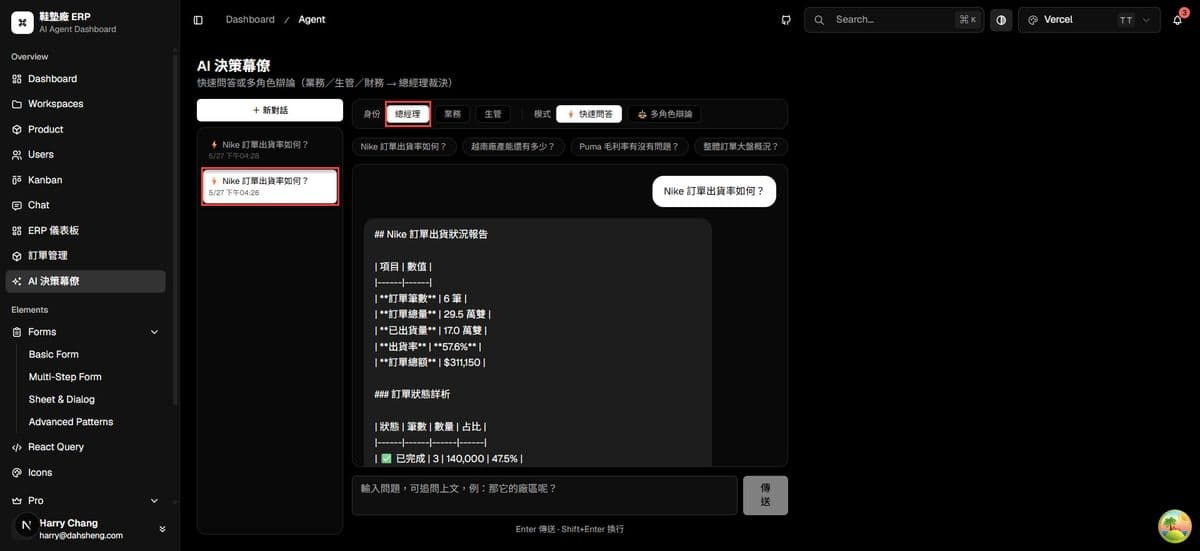
對話持久化
- 對話後切換到「ERP 儀表板」
- 切回「AI 決策幕僚」→ 對話歷史仍在(來自後端 JSON)✅
- 重新整理頁面 → 對話歷史仍在 ✅
多對話切換
- 點「+ 新對話」→ 清空輸入,開始新的對話
- 左側清單顯示舊對話(⚡ Nike 出貨率…)
- 點舊對話 → 還原 UI 訊息,繼續問答時 AI 自動接續舊上下文 ✅
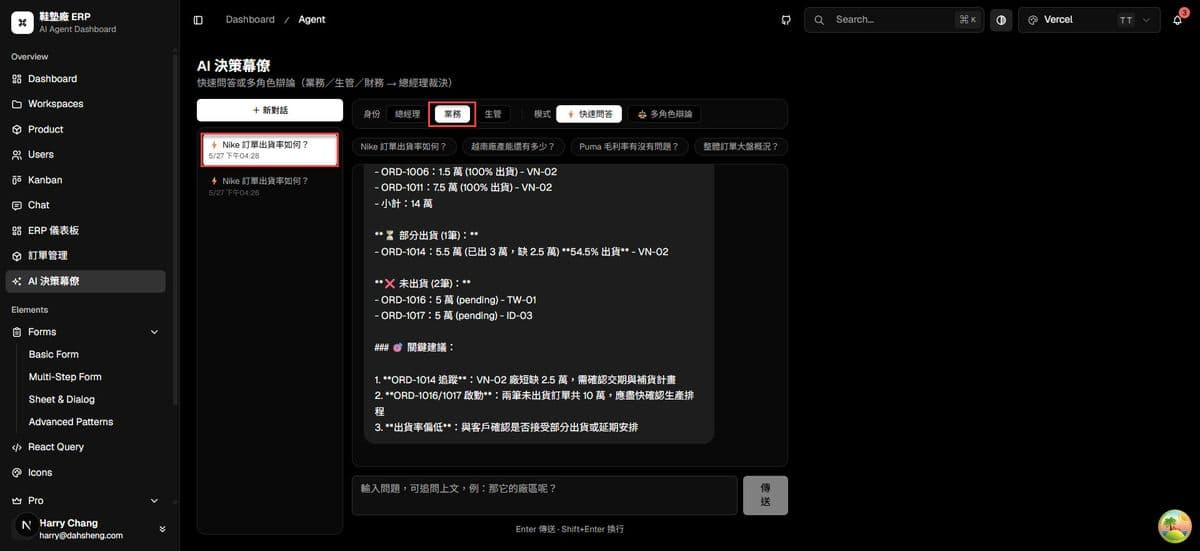
記憶行為說明
切換到舊對話後,AI 自動接續舊的對話上下文
| 操作 | UI 顯示 | AI 記憶 |
|---|---|---|
| 同一對話連續問答 | 顯示所有訊息 | ✅ 記得(後端 history_json 在 JSON 檔) |
| 切換到其他對話再切回 | 顯示歷史訊息(從後端載入) | ✅ 自動接續(後端每次請求依 conv_id 載入 history_json) |
| 重新整理頁面 | 顯示歷史訊息 | ✅ 自動接續(後端每次請求依 conv_id 載入 history_json) |
今日 Checklist
-
data_loader.py新增load/save/delete/list_conversations -
routers/conversations.py(CRUD 路由) -
main.py加入conversations.router -
routers/agent.py支援conv_id:載入 + 存回history_json -
routers/debate.py支援conv_id:_append_debate_turn存辯論結果 - Next.js proxy:
/api/conversations+/api/conversations/[convId] -
agent-chat.tsx:API helpers 取代 localStorage,conv_id取代history_json -
ConversationList元件(清單 / 新增 / 刪除) -
AgentChat左右兩欄佈局 -
handleSelect切換 + 從後端載入訊息(UI 顯示) - 🧠 AI 記憶狀態提示
- Step 6 升級:
data/agents/*.json四個角色性格外部化 - Step 6 升級:
build_system_prompt()組合器 +refresh_debate_agents()熱重載 - Step 6 升級:財務否決門檻
veto_threshold_pct改為可設定 - Step 6 升級:
routers/agent_profiles.pyGET / PUT / refresh 端點
小結
今天實作了三層「記憶」,並把對話從瀏覽器搬到後端,同時加碼將 Agent 性格外部化:
- 後端 JSON 持久化 —
backend/data/conversations/{user_id}/目錄,切頁面、換裝置都不丟資料 - 多輪 LLM 記憶 —
conv_id→ 後端讀取history_json→message_history注入agent.run() - 對話管理 — 清單 / 切換 / 刪除,類 ChatGPT 的操作體驗
- Agent 性格 JSON 化 —
data/agents/*.json統一管理四個角色的個性、分析重點、特殊規則;PUT API 熱重載,無需重啟伺服器
關鍵設計:切換對話時前端只需傳 conv_id,後端每次請求自動從 JSON 載入 history_json 並注入 message_history——UI 歷史顯示與 LLM 上下文還原同步完成,切換後 AI 即可接續上文回答。
明天 Day 30:30 天系列總結,回顧整體架構演進與未來可延伸的方向。